7 Code review
Ensuring our products are stable and high-quality
Code review is intended to ensure that main is maintainable and kept to a high quality. The idea is that more than one person in the team should be able to understand what developments are being made from a technical perspective, and ensure that any changes that are made don’t make the product worse rather than better.
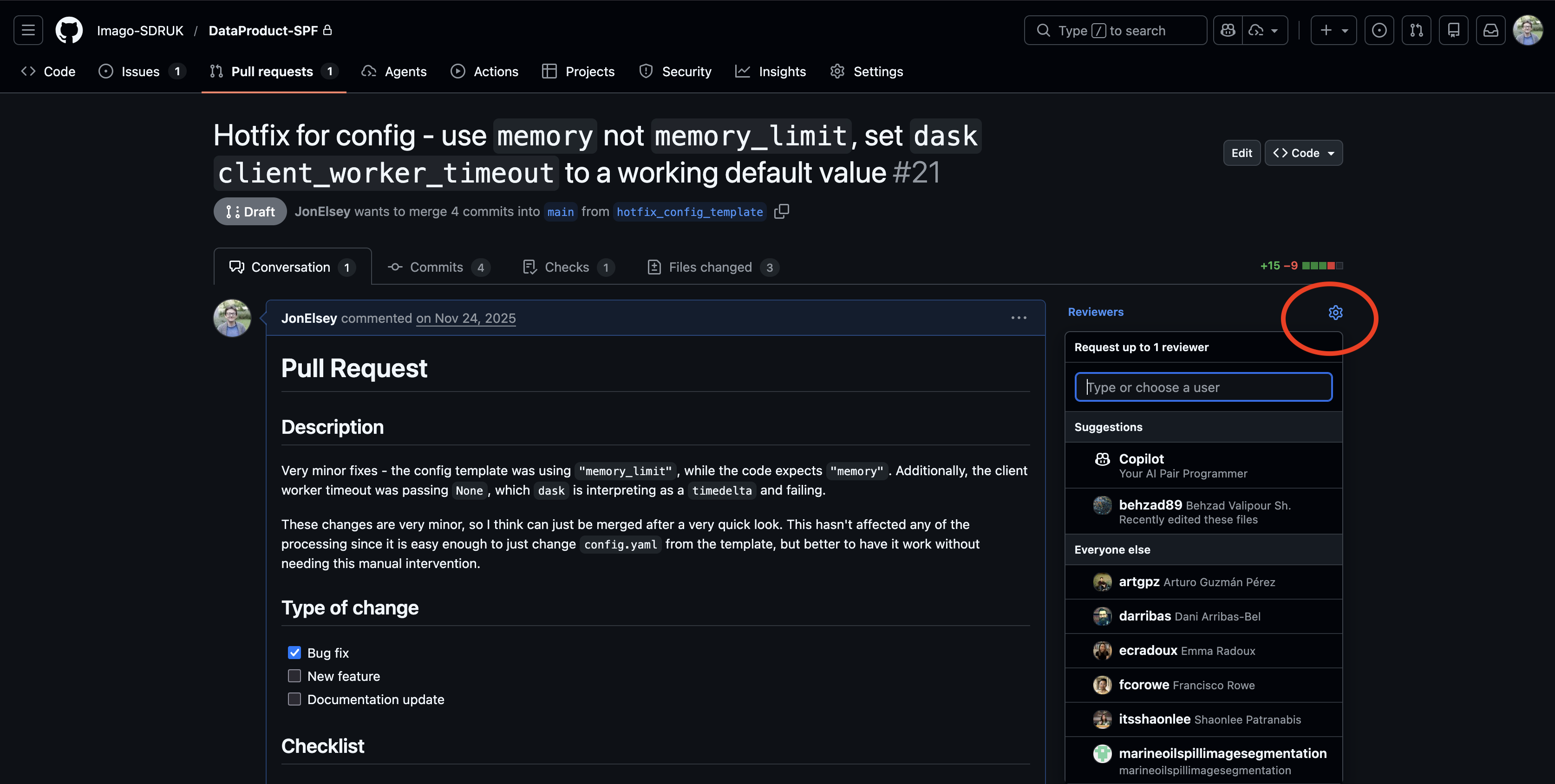
Choosing your reviewer
Pick a colleague who is:
- 1: best-placed to understand how and why you have done what you have done.
- 2: available to review!
You should use the buttons to assign them to be a reviewer - this is not a faux pas, but a useful way to draw someone’s attention to some work they’re probably interested in.
Being a reviewer
Code review is a bit different from being a paper reviewer - the key difference being that we’re all part of the same team.
When reviewing, reviewers should consider:
- Intent: Does the author’s work do what it intends to do?
- Stability: Does the author’s work break other pieces of code within the repository?
- Changing answers isn’t inherently a problem - as long as those changes are understood!
- Reproducibility: Can another developer run this code and understand how it gets its results?
- This is a lot easier if we have (automated) tests (a topic for a future workshop)
- Scope: Is the change limited to the scope of what the author says?
- If there are lots of other unrelated changes, these should be a separate PR!
- Readability: Is the code readable to someone who didn’t write it?
- Comments and docstrings are important here - as is the overall structure (small digestible chunks, not enormous unbroken scripts)
- If you don’t understand it now, chances are the original author won’t understand it when they revisit it in 6 months!
When giving feedback:
Please don’t be Reviewer 2!
- Read the PR description and any linked Issues before diving into the code. Understanding intent is more than half the battle.
- Suggest ways to implement any suggestions you make - e.g. “you could try using
numbahere as compiling this loop should make things a lot faster” - Split feedback into things that really need fixing (blockers), and things that could be touched up or improved (advisories).
- e.g. a critical bug that changes results should prevent it from being merged until it is fixed, but a documentation typo can just be flagged.
- Approve based on the blockers being fixed, not the advisories.
- If something is unclear - ask for clarification. If you don’t understand it now, then chances are the original author won’t understand it when you revisit it in 6 months time.
- Review the code as-is - not as you would have written it. Don’t block based on personal style.
Don’t ask the author to add e.g. extra analysis/features if they are not necessary for the PR to fulfil the original intent.
You or the author could create new Issues for these ideas and then work on them later.
Don’t see code review just as a chore that you need to get through! It gives you an opportunity to see what your colleagues are working on, both in terms of science but also the way in which they write code.
It might seem like a lot of work, but in the long run it will save everyone time - short-term slowdown vs long-term efficiency. It is much better to find and fix a bug now than it is 2 days before a paper deadline!
Responding to reviewer comments
- As with reviewing, this is not like a paper review response. Be proactive rather than reactive! It is a conversation, not a document. Chat with your reviewer and discuss the changes on-the-fly, and iterate on ideas until they are ready.
- If a discussion thread is getting complex - you can always schedule a call with the reviewer! Just make sure to document what the outcome of that discussion was.
- Reviewer comments are suggestions. If you can justify why a suggestion isn’t necessary, then chat with your reviewer about it. Fix the blockers that the reviewer flags, try and fix the advisories, and create Issues for those that you can’t or for new ideas that come out of the review process.
7.1 Closing issues/PRs
- Close issues/PRs when they are good enough; that the original intent is satisfied, and it doesn’t make
mainworse. Perfect is the enemy of the good!- You can always create new Issues later if you realise that what you’ve done doesn’t work for some edge case you hadn’t thought of, or if you come up with new ideas for extensions.
- Avoid scope creep - submit and close your PRs when they fulfil their task, avoid the temptation to keep adding more stuff. Remember - smaller PRs are generally better - so split this work up into a new one!
Merging into main
Once your Pull Request has been approved, the final step is to merge your work into main.
Before merging:
Make sure all review comments are resolved.
- If your reviewer marked anything as a blocker, fix it before merging.
Check that your branch is up‑to‑date with main. If GitHub says “This branch is out‑of‑date”, click Update branch (or merge main into your branch locally).
- This will flag whether we have any merge conflicts.
Resolve any merge conflicts that do arise!
Press the “Merge pull request” button.
- GitHub will show a green button at the bottom of the PR once everything is ready.
Who merges?
This is dependent on who has write access in the repository. In Imago, most of us have write access to repositories we are working on.
Pull requests and code review are for feedback and approval. Once this approval is given, the onus is on the creator of the PR to merge their work. However, if the creator doesn’t have write access, then the reviewer must merge the work once it is approved.
That said, these are not hard and fast rules - as long as there is a consistent expectation within your team.